




Intercoms stop at the end of the group
A Bluetooth intercom pairs riders together and holds them within a few hundred metres of each other. Lose the group at a junction and you lose the conversation. MumbleWay puts the conversation on the internet instead: everyone joins the same Mumble channel over mobile data, and it makes no difference whether the next rider is a hundred metres ahead or in another country.
What it is not is a general-purpose voice app with a motorcycle icon. Every decision in the capture chain assumes a microphone a centimetre from your mouth, inside a helmet, at speed, with wind and an engine underneath.
Mobile data, not a radio link between helmets.
48 kHz, with forward error correction that rises as the link degrades.
Any Mumble server. No account, no directory, no company in the middle.
What it does about noise
Speech from inside a helmet at speed is a hard signal. The chain is built for it, and every stage is visible while it runs.
- A neural speech enhancer at the head of the chain. DeepFilterNet 3, on the phone, in the 10 ms a block gets. It is the single largest lever here — on the road it separates speech from the gaps between it by around 16 dB where the rest of the chain manages 1.5 — which is why it is the first thing softened and the last thing given up when a device runs short.
- Wind and engine suppression tuned for a helmet, with lighter profiles for standing still and for indoors, and an automatic setting that picks between them from what it hears.
- Echo cancellation that measures its own delay. A helmet speaker sits centimetres from the microphone and comes back almost at once; a phone on loudspeaker comes back after everything between the app and the speaker has had its turn, which is a different problem and used to be an unsolved one. The canceller now finds where the echo actually is before trying to remove it.
- Voice activation that is not causal. A threshold decides mid-syllable, so by the time the gate opens the sound that opened it is already gone. The audio is delayed and the decision is not: the channel opens on the sound that led into it, and a word starting on “s”, “f” or “sh” keeps its first consonant instead of arriving as “ixty”. Measured on three real rides, 160 ms of look-ahead covered 94% of openings against 90% at 80 ms.
- The delay is then paid back. Carrying a fixed look-ahead for ever is latency on every transmission to protect the first tenth of a second of one. So a phrase opens 240 ms ahead and the debt is repaid at 1.1× — pitch periods removed whole, so duration changes and pitch does not — until the delay settles at 200 ms. Not zero: a little slack absorbs a late block instead of turning it into a dropout.
- The channel then holds for a full second after you stop, fading over the last 30 ms so a trailing “t” or “s” survives and the cut is not a click. A second bridges the gaps inside a sentence, which is what stops a phrase arriving as four fragments.
- Feedback suppression, a de-hisser, automatic levelling and a limiter.
- An elastic jitter buffer that plays a backlog off at up to double speed by removing pitch periods, rather than letting a tunnel put everybody a second behind.
When a phone cannot keep up
A block of audio arrives every 10 milliseconds, and the whole chain has to be finished before the next one turns up. On a current phone that is comfortable. On an outdated or entry-level one it is not, and the useful thing to do about that is not to pretend otherwise.
So the device is measured against the deadline when the app starts, before your first call, and watched while you talk. If it does not fit, stages are given up one at a time — in an order that was measured rather than guessed, and never quietly.
The speech enhancer is also timed on its own at that point, because it is the one stage large enough to decide the answer by itself. A phone where the model alone takes 4 ms of the 10 has no room for the seven stages behind it, whatever the total happens to say on a device that is not yet in a call — so it loads the cheaper model straight away, rather than working down through eleven other stages to arrive at the same place a conversation later.
The cheapest quality goes first. The enhancer softens by two steps before anything else is touched: they are the two largest savings on the chain and cost almost nothing, and on voice over music the first of them measured better than the full setting. Then the look-ahead stops being paid down, which changes no sample a listener hears — only the delay goes back up to what it was before that existed. Then the echo canceller’s filter halves, keeping the loud direct path and giving up about 10 ms of the tail behind it. Then three detectors whose work the level meter largely duplicates. Then the diagnostics panel’s own drawing, which is free to give up because nobody’s voice passes through it. Then the rest of the panel’s liveness — the moving dots and the per-speaker meters — for the same reason. Then a cheaper, more aggressive noise model. Switching the enhancer off is the thirteenth and last thing tried, because it is the one that turns 16 dB of separation between speech and gaps back into 1.5.
Below the ladder there is one thing left. If every stage above has gone and blocks are still late, the chain asks what is actually taking the time. Echo cancellation is the only stage whose cost is set by the other end of the call rather than by your phone — it does almost nothing while nobody else is talking — so on the rare device where that is what the blocks are going over on, its filter is shortened again, in steps, until it covers the loud direct path and nothing more. It is never switched off: on a loudspeaker that is a howl, and the guard that would have caught one went eleven stages earlier.
It does not climb back during a session. A device that was late once will be late again, and a chain that switched stages on and off as the load moved would sound worse than either state. Restarting the app tries the whole chain again.
And it tells you. Stages that have been given up are struck through in the diagnostics panel, the toolbar icon becomes an amber warning so you find out without going looking, and the panel says in plain words what was dropped and what it costs.
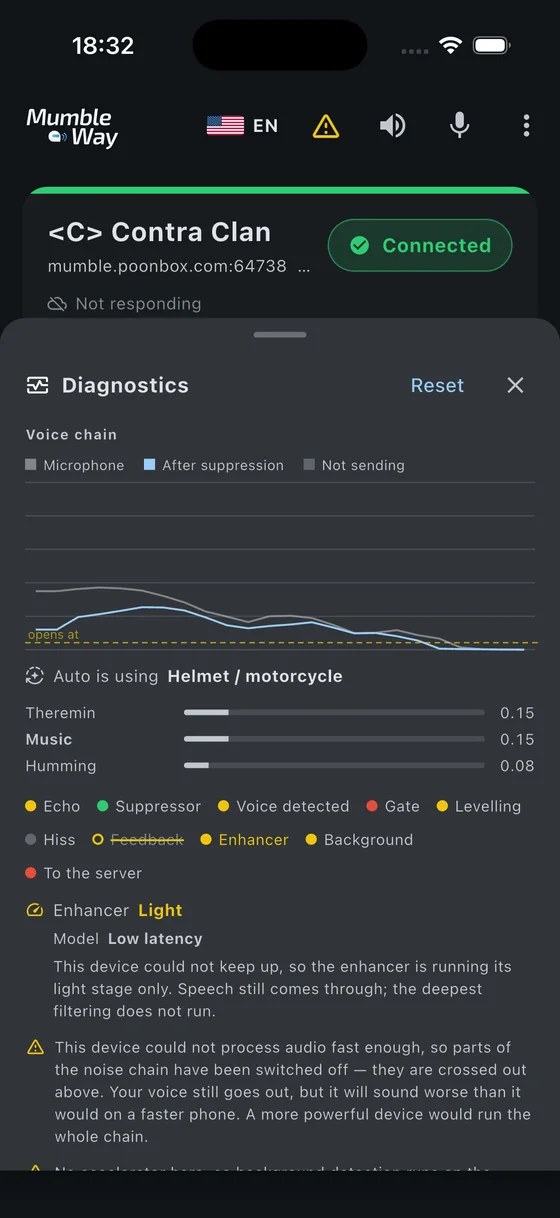
One thing worth knowing: this measures the device as it finds it, not as it could be. A computer that is busy with something else when the app opens can start a step lower than the same computer idle.
Watch how it works
Most voice apps tell you nothing. When somebody says “it cut me off”, there is no way to find out which stage cut them.
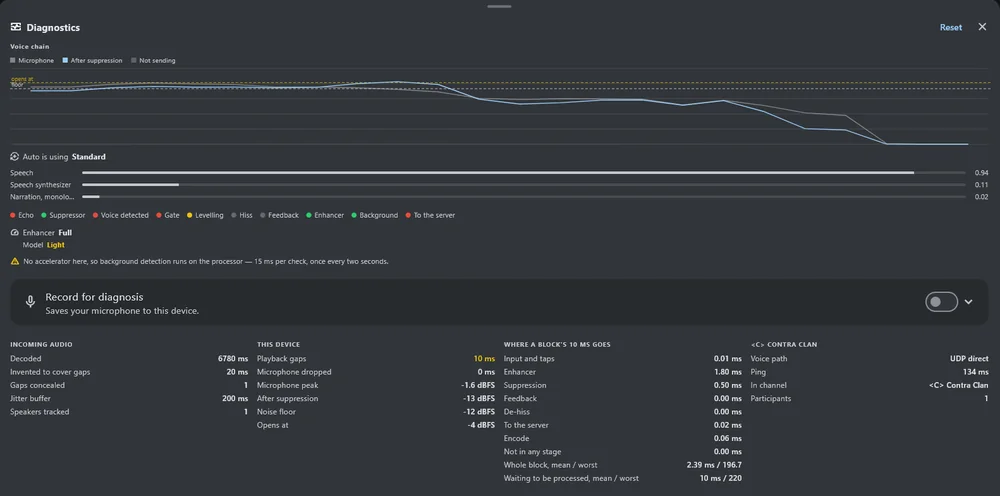
MumbleWay has a diagnostics panel with a live spectrum analyser showing three traces at once — microphone, after suppression, and what is actually being sent — with a light per stage of the chain. The sent trace going flat while the other two do not is the most useful thing it shows.
It can also record what the microphone heard along with what the chain decided about it, block by block, so a recording that cuts out can be examined rather than guessed at. That exists because a whole round of measurements was once invalidated by discovering the recordings behind them had come from the phone’s own microphone rather than the headset’s. Audio carries no record of what captured it; recording from inside the app makes it the chain’s own input by construction.
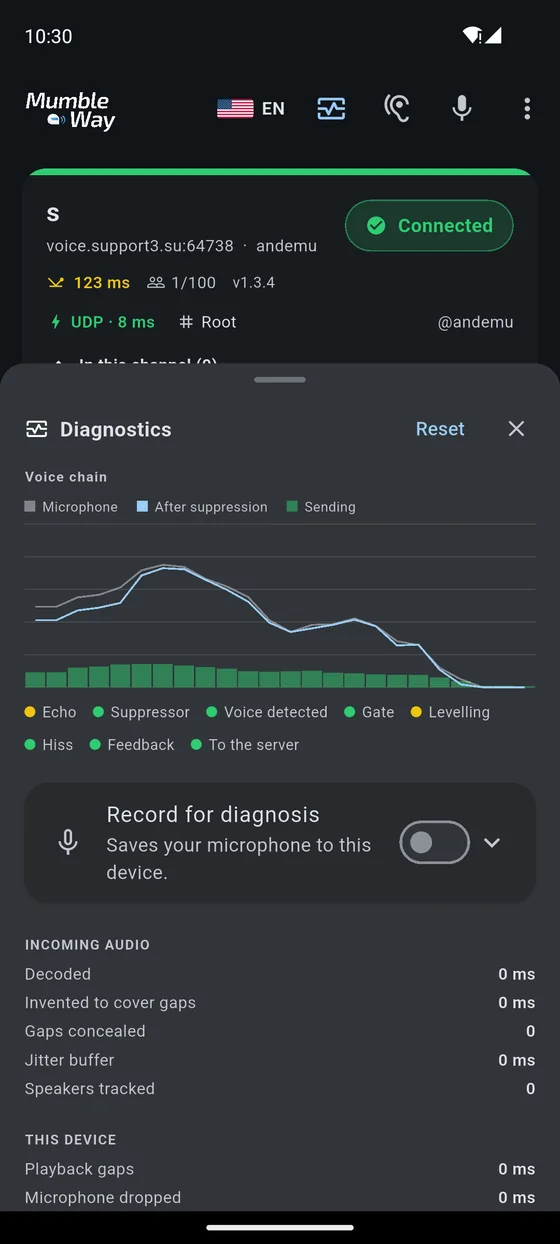
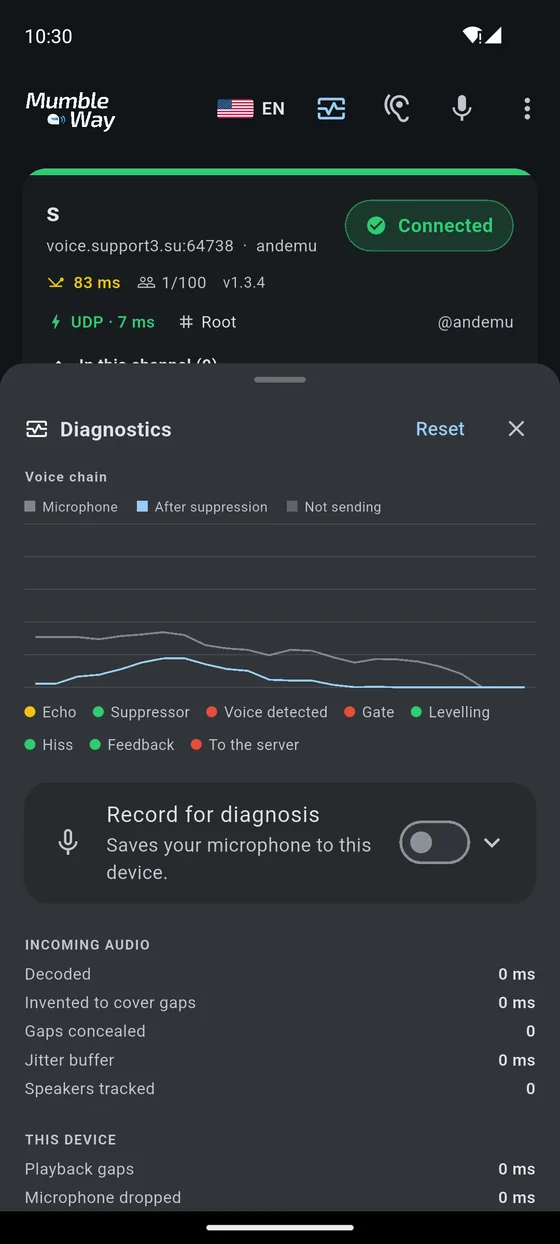
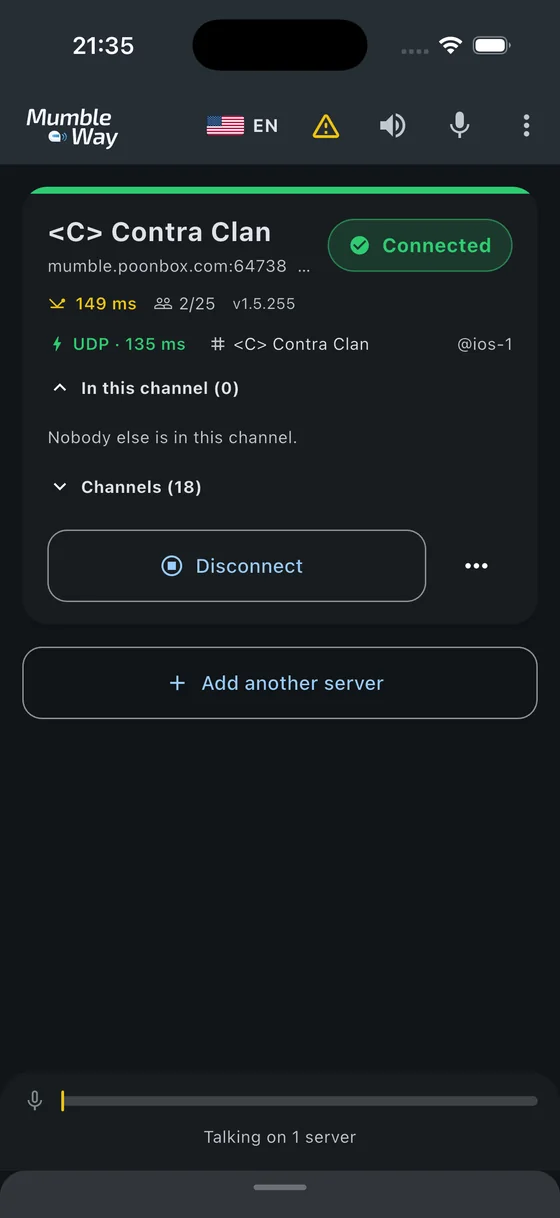
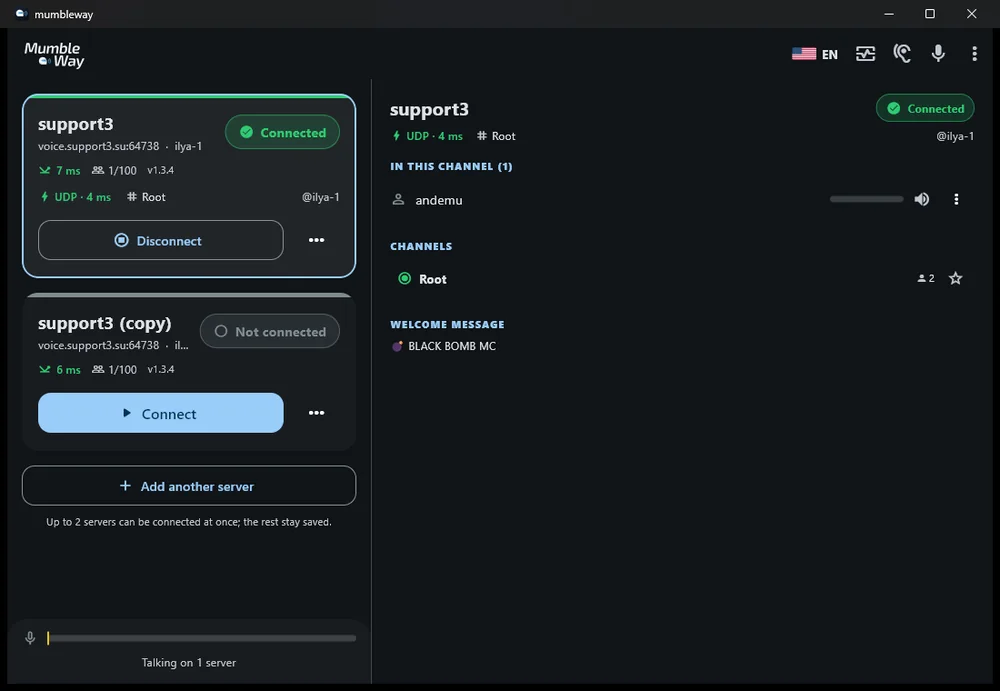
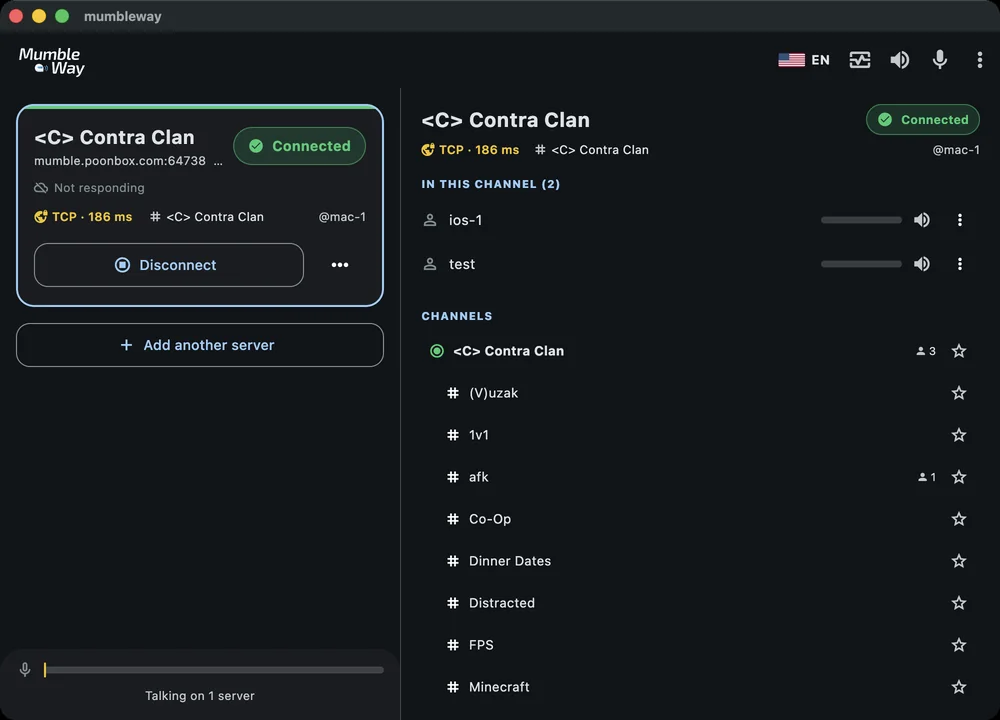
On a desktop the same thing is a two-pane window: your servers down one side, the channel and who is in it down the other.
Advantages
Range is not a constraint
Riders separated by traffic, a junction or a border stay in the same conversation. An intercom cannot do this at any price.
Your server, your rules
Any Mumble server will do, including one on a Raspberry Pi at home. There is no account to make and no directory your channel appears in.
More than two riders
A Mumble channel holds as many people as the server allows, without the chain-of-hops fragility that mesh intercoms have.
It shows its working
A live analyser, per-stage status, and recordings that carry the decisions alongside the audio.
Nothing is collected
No account, no analytics, no advertising, no telemetry. Audio is never stored unless you turn recording on yourself. See the privacy policy.
Free software
GPL v3, source in the open, and it speaks a documented protocol with other clients rather than one vendor's.
Disadvantages
Worth reading before you rely on it. These are real and none of them is going to be fixed by a setting.
No signal, no conversation
This is its defining weakness. An intercom keeps working in a valley, a tunnel or a dead spot; this does not. If your riding is mostly remote, an intercom is the better tool and this is a supplement to it.
It costs mobile data and battery
Roughly 3–6 MB per hour of talking on the wire, more with error correction on a poor link. A phone doing continuous voice over mobile data with the screen off still gets noticeably warmer than one that is not.
Latency is a network's, not a radio's
The capture chain contributes little — the look-ahead pays itself down to 200 ms — but the network does not, so expect a couple of hundred milliseconds on a good mobile link and more on a bad one, against near-zero for an intercom between two adjacent helmets. Conversation works; interrupting somebody mid-sentence does not land the way it does face to face.
Bluetooth costs you audio quality
A headset microphone is only reachable over the hands-free profile, which is mono and narrowband. While a call is up, music through the same headset drops to telephone bandwidth. That is a property of Bluetooth, not of this app, and every voice app on your phone has it.
You need a server
There is no MumbleWay service to sign up to. Someone in the group has to run a Mumble server or rent one — a deliberate choice, and still a step that an intercom does not ask of anybody. It takes about ten minutes.
Music can occasionally key the channel
This was the worst thing about the app and is now a footnote. Speech over your own music goes through 98% of the time where it used to be 63%, and the enhancer takes 19 dB out of the gaps between your words — music that used to sit a decibel and a half under the speech now sits sixteen under it. In riding since, music keys the channel only rarely, and what gets through arrives well down rather than at level.
It is not zero, and the reason it is not is worth knowing: the detector was trained to tell speech from noise, and music is neither. Push-to-talk removes the possibility entirely if you need certainty, and the work is documented in the open, including every attempt that has already failed.
Where to go next
Settings
What every setting does, and which ones actually matter on a bike.
On the road
Setups that work: a pair, a group, a passenger, a rally.
Your own server
Mumble server on Windows, macOS or Linux, in about ten minutes.