
Faults like “it cut me off mid-sentence” cannot be diagnosed from a description. A recording carries the audio and what the noise chain decided about every 10 ms of it, which is what makes the difference between reading a fault and guessing at one.
Record the fault
- Open Diagnostics — the waveform icon in the toolbar.
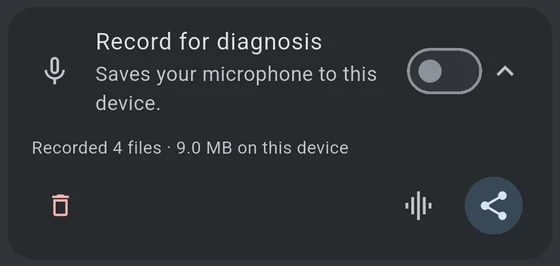
- Expand the Record for diagnosis card and turn the switch on.
- Ride, and provoke the fault. Talk the way you were talking when it went wrong, at the speed it went wrong at, with the same headset.
- Turn the switch off.
Thirty seconds of the actual problem beats ten minutes of ordinary riding. If the fault is intermittent, record the whole ride — the log makes it possible to find the moment afterwards.
It records your microphone. Not the conversation, not the other riders — your own microphone, as the app hears it. Anything you say while it is on is in the file, so turn it off when you have what you need.
Listen to it first
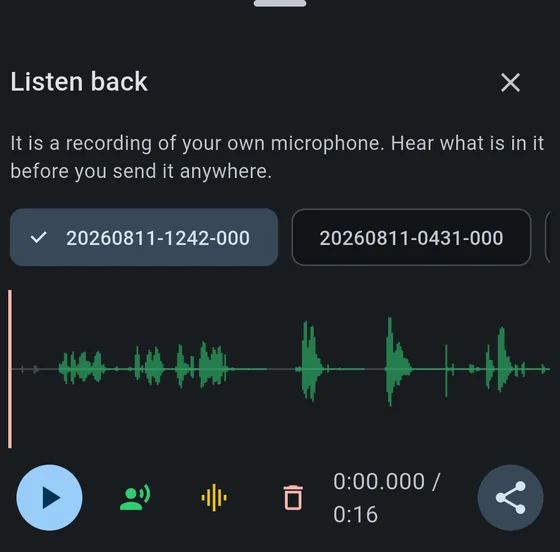
Before you send anything, play it back: the Listen back button in the recording card opens a waveform with a playhead you can drag or tap to scrub. It is a recording of your own voice and you should know what is in it. If you would rather not send the audio at all, you do not have to — see below.
Hear what the others heard
The recording is your microphone, on purpose — taken before the noise chain touches it, so it is what the phone heard rather than what the app made of it. That is the right thing to keep and the wrong thing to answer “is this what everyone else got?” with. Two controls beside play answer it between them.
The green stretches of the waveform are the parts that went to the server; everything else was recorded but never sent.
| Control | What it does |
|---|---|
| Green — speaking head | Plays only the green stretches, skipping everything the gate rejected. Which parts went out, read from the log of what the app decided at the time. |
| Amber — level bars | Plays through the noise chain, so you hear the treatment your voice was given rather than the raw microphone. |
Turn on both and what is left is what the far end actually got — without a second phone, a second account, and trying to judge your own voice coming back at you.
It is the fastest way to answer the question that matters: was I cut off, or did it just sound like it? If words are missing from that playback, they were missing for everyone.
If a recording has no green in it at all, a line under the waveform says why — usually that the microphone was muted, or that push-to-talk was set and the button was never pressed.
Send it
The share button produces one or more .zip files, each under 18 MB so they
fit through anything.
The quickest way to ask
The Discord server is where to say what went wrong and find out what to send. It is also the fastest way to be told the Telegram bot’s name, which is the easiest route for the archive itself.
Do not post the archive into a Discord channel. It is a recording of your own microphone, and a channel is other people. Ask first and send it where you are told to.
If you are already in touch with the developer
Send the archive to the Telegram bot. It unpacks, converts and files it automatically. Ask for the bot’s name.
Otherwise, the general route
- Share the archive to wherever you already keep files — Drive, iCloud, Dropbox, WeTransfer, email to yourself.
- Open an issue at github.com/zavitax/mumbleway/issues.
- Paste the link, and say what went wrong and roughly when in the recording it happened.
Please do not attach the audio to the issue itself. Issue attachments are public and permanent. A link you control can be taken down again; a file on a public issue cannot.
If you would rather not send audio at all
Send only the .csv file from the archive. It contains no sound — it is
numbers — twenty-three columns, one row per 10 ms of the ride. Whether the
channel was open, whether speech was detected, the signal-to-noise ratio, the
level, the noise floor, and eighteen more listed below.
Most questions are answerable from that alone: did the gate close, when, and what was the chain looking at when it did. It is small enough to attach to an issue directly, and there is no voice in it to think twice about.
What is in the archive
| File | What it is |
|---|---|
YYYYMMDD-HHMM-NNN.s16 |
The audio, exactly as the chain received it: raw 16-bit PCM, mono, 48 kHz, no header |
YYYYMMDD-HHMM-NNN.csv |
One row per 10 ms of the ride, twenty-three columns, named in a header line. They are listed in full below |
The two share a name and belong together: the audio without the log is a recording nobody can say anything about, and the log without the audio is still useful.
transmitting is the important column. It is what actually went on the wire —
envelope, mode and mute included — so a run of zeros in the middle of speech is
the fault, visible without listening to anything.
mode and muted are there because that column can be zero for a reason that
is nothing to do with the noise chain: mode is 0 for voice activated, 1 for
push to talk and 2 for continuous, and muted is the microphone switch. A
recording where nothing went out because the microphone was muted looks
identical, in every other column, to one where the gate never opened — and
those call for opposite answers.
gain_db is the microphone gain slider, for the same kind of reason. A
recording that sounds distorted can be an overdriven input or a chain
misbehaving, and the one control that decides which was, until now, the only
setting in the app that left no trace in the file.
New columns are added on the end and never in the middle, so a reader that finds them by name keeps working and older recordings stay readable.
Every column
In the order they appear. The file carries a header line naming them, so a reader should find them by name rather than by counting commas.
| Column | What it holds |
|---|---|
block |
Which 10 ms this is, counting from the start of the recording |
transmitting |
What actually went on the wire — envelope, mode and mute included |
speaking |
The chain’s own verdict that this block is speech |
gate_open |
Whether the gate was open, which is not the same thing: the gate can be open on a block the chain does not call speech |
vad |
RNNoise’s own probability, 0 to 1, before the other two tests are applied to it |
snr_db |
How far this block stands above the tracked background |
level_db |
The level the gate judges, measured after suppression |
floor_db |
The background the chain believes it is in |
harmonicity |
How periodic the block is at a human pitch, 0 to 1. This is what rejects a loud engine: its firing fundamental sits below the range searched |
modulation |
Whether the recent loudness is moving at a talking rate. Measured and recorded, and nothing is decided by it — it is here to be looked at, not because it acts |
mode |
0 voice activated, 1 push to talk, 2 continuous |
muted |
The microphone switch |
gain_db |
The microphone gain slider, per block, because a rider can move it mid-ride |
echo_ref_samples |
How much reference the canceller had for this block. 480 is a full block; 0 is none, so nothing could have been cancelled; anything between is the queue running dry mid-block, which splices silence into the reference and moves every alignment after it |
aec_on |
Whether echo cancellation was switched on at all |
erle_db |
How much the canceller removed |
aec_lag_ms |
Where it believes the echo is, behind the reference |
aec_confidence |
How convincing that measurement was, 0 to 1. Read as a pair with the lag: the aligner aims deliberately early, so a low lag is the design working, while a confidence that will not rise is the estimator failing to find the echo at all |
aec_spread_ms |
How far apart the arrivals were. Wider than the filter’s own span means a second echo it cannot reach |
aec_taps |
The filter’s length, which the performance ladder shortens. Meaningless when aec3 is 1 — AEC3 has no such dial |
aec3 |
Which canceller produced the block: 1 for AEC3, 0 for the time-domain filter. They fail differently, so a recording that cannot say which it came from cannot be read |
profile |
The suppression profile actually in force: 0 off, 1 light, 2 standard, 3 helmet. Never Auto — Auto is a rule for choosing, and what is recorded is what the audio went through |
route |
Which microphone it came from: 0 not known, 1 the phone’s own, 2 a wired headset, 3 Bluetooth hands-free, which is narrowband, 4 USB or dock, 5 something else the platform named |
The numbers in mode, profile and route are a wire format and are never
renumbered. Recordings already sitting on phones are read with the meanings
above, and a reader written months from now has nothing else to go on. New
values take the next free number.
route is worth knowing about even if you never read the file. It exists
because a directory of recordings from the phone’s own microphone looks exactly
like one from the headset’s, and a whole round of measurements was once thrown
away over that. Before this column, the answer had to be inferred from the
audio’s bandwidth — a Bluetooth hands-free link stops dead at 3.4 kHz where a
built-in microphone runs to 16 — which worked, and was a spectrum analysis
standing in for a digit.
Playing the audio yourself
The .s16 has no header, so a media player will refuse it. Tell a tool what it
is:
ffplay -f s16le -ar 48000 -ac 1 20260808-1139-000.s16
Or convert it to something ordinary:
ffmpeg -f s16le -ar 48000 -ac 1 -i 20260808-1139-000.s16 ride.wav
Audacity will import it too: File → Import → Raw Data, then signed 16-bit PCM, little-endian, 1 channel, 48000 Hz.
What happens to it
Nothing automatic. The app has no servers, uploads nothing on its own, and the developer receives only what you choose to send, to a destination you chose. The privacy policy says the same thing in more detail.