

Diagnostics is not in Settings. It is the waveform icon in the toolbar, and nothing in it changes how the app sounds.
It exists to answer why did that happen, which is a different job from Settings and needs a different page. It is the first thing to open when somebody says they could not be heard, and the sections below are in the order the panel shows them.
The live analyser
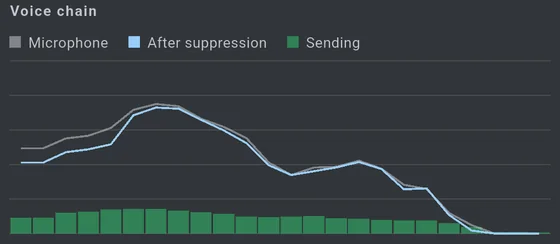
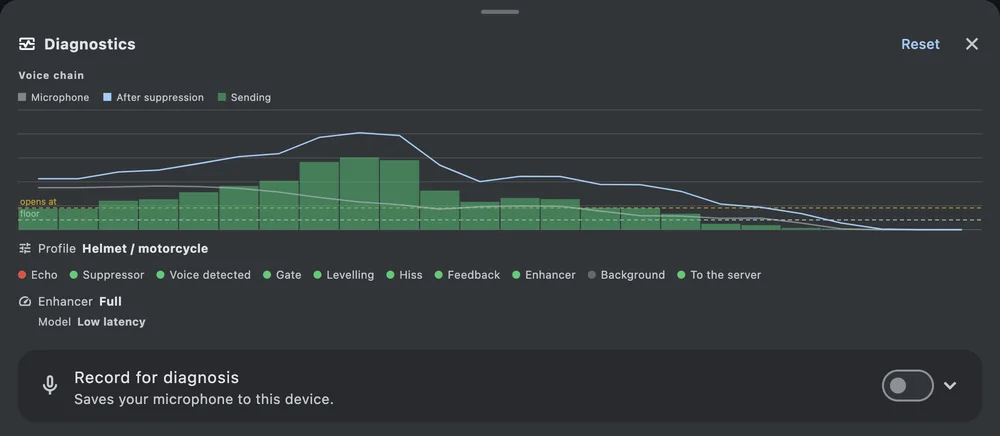
Grey is the microphone before anything touches it, blue is the same audio after suppression, and green is what actually went to the server. They are measured on the same block, which is the whole point — you are watching one decision, not three unrelated meters.
When the green falls away while the other two do not, the gate closed on you. That is the fault riders report as “it cut me off”, and this is the one place it is visible while it happens.
The analyser costs nothing when the panel is shut: it is asked for by being read, and the request lapses half a second after the last read, so closing the panel — or just backgrounding the app — stops the transforms without any switch to remember.
A light per stage
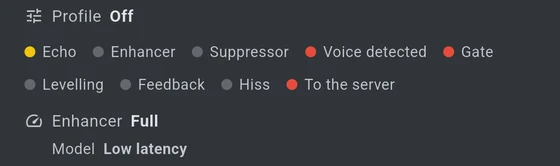
One dot per stage of the capture chain: echo, enhancer, suppressor, voice detected, gate, levelling, feedback, hiss and to the server. The colours mean the same thing at every stage — green is working and passing audio on, amber is working but holding something back, red is stopping audio here, and grey is switched off and therefore has no opinion.
The last one is the one to read first. To the server red means your voice is not leaving the phone, and the dot to its left usually says which stage stopped it.
Why Automatic chose what it chose
Under Automatic, above the dots, one line says where it landed and what decided it: Auto is using Helmet (14 dB over the room).
That figure is the margin between your voice and the background, measured across the first second after the gate opened on a phrase. It is the whole input to the choice — below 20 dB the helmet setting, below 35 dB Standard, above that Light — so the line is not a label with a number beside it. It is the reason, and you can disagree with it.
There used to be three more rows here, the top labels from a sound classifier that listened for engine, wind and music, each with a score. The classifier has been removed from the chain and those rows are gone with it. A margin the chain already measures answers the same question, and answers it about the thing that decides whether you are understood: not what is behind you, but whether you are louder than it.
When the chain has to give something up
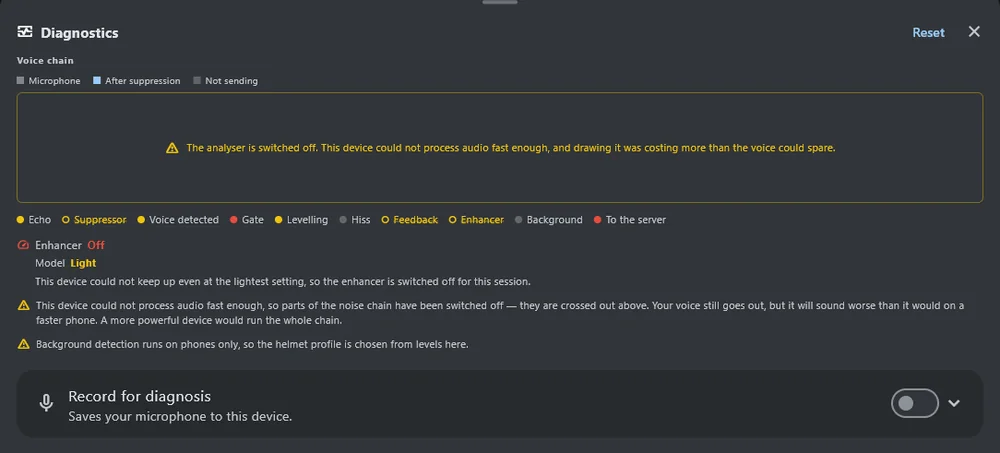
A device that cannot finish a block in 10 ms gives stages up in a measured order, and this panel is where you find out exactly which.
Struck-through names in the dot list are the stages that have been switched off. They keep their place in the row rather than disappearing, so the chain still reads as the chain.
Enhancer names the rung the speech cleaner is on — Full, Reduced, Light or Off — with a sentence saying what that costs. Model says which of the two cleaners is loaded, Low latency or Light; see Light noise model.
The analyser can be given up too, and when it is, a note stands where it was. That is deliberate: a blank box would read as a broken analyser, which is the one thing it must not, because the analyser is what most people open this panel to look at. The reading it drew is gone; nothing about your voice changed.
The toolbar icon becomes an amber warning at the same time, so none of this depends on the panel being open.
Counters
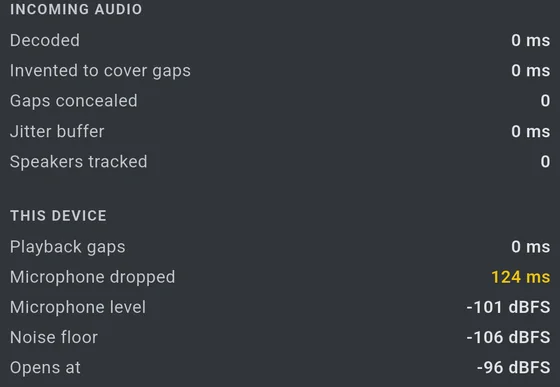
Incoming audio is about what other people sent you: milliseconds decoded, milliseconds invented to cover gaps, how many gaps were concealed, how much is being held in the jitter buffer, and how many people are being tracked.
This device is about you. Playback gaps and microphone drops are both “this phone could not keep up”; playback gaps is the one that says to raise the incoming audio buffer.
Microphone peak is the loudest sample the microphone has delivered, taken before anything in the app touches it, with a count of samples that reached full scale. It is the only number here measured on the input, and it is the one to read if the sound is distorted: the meter beside the gain slider used to be measured after suppression, so an overdriven microphone was invisible to the one control that sets the input level. If this sits at 0.0 dBFS and the clipped count climbs, the input is being overdriven and nothing downstream can undo it.
The last three are the voice gate, in numbers, and they are all measured after suppression so that they can be compared with each other: after suppression is the level the gate is judging, noise floor is what the app has settled on as this environment’s quiet, and opens at is the level a block has to beat to be sent. On a bike at speed the floor climbs and the threshold climbs with it — which is what the noise profiles are for.
Before the chain, and inside it
Six readings that are not about the network at all.
Microphone clipped counts samples that hit the top of the scale on the way in — before any stage has touched them. It is the one measurement here taken ahead of everything it could blame, and that placement is the point: a measurement taken after the thing you are debugging cannot exonerate it. If this is climbing, the microphone gain is too high and no amount of noise suppression will fix what has already been squared off.
Gain backed off is what the clip guard is holding back to stop that, in decibels. A steady small figure is the guard doing its job. A large one is the input asking for a gain slider that is too high.
Floor held is how long the chain has stopped its background estimate from climbing, because something is speaking. Without it the background reading would rise into your own voice and the gate would gradually shut on you. A held floor and a low floor are the same number from outside, and only one of them means the chain is protecting a phrase — which is why this says so rather than leaving it to be inferred from the row above.
Freeze overruled should read zero. Anything else means the floor was held down for a full minute without a break: either a phrase longer than any yet measured, or something latching onto a sound that is not a voice.
Voice restored is the last thing done to your voice before the limiter — how much is being lifted back, and where. The speech enhancer takes level as well as noise, and this puts it back in a bell around the frequencies it was taken from rather than turning everything up. Restore cost is what those two steps cost the block, in milliseconds.
Echo cancellation
Four numbers, because one cannot answer the question. Echo removed on its own reads the same for a headset with no echo to remove, a canceller that never located the echo, and one that located it and failed — all three report nothing.
So beside it: echo found at, which is how far behind the reference the echo actually arrives, and confidence, which says whether that is a measurement or the last one it managed. A confident delay with nothing removed is a canceller that knows where the echo is and cannot cancel it, which is a different fault with a different cause.
Echo returned is a different measurement from the four above, and the only one that says anything about a canceller that is not ours. It is how far below what was played the microphone signal sits while the far end is talking and you are not — so a large figure means little of the speaker is reaching the microphone, by whatever route and whoever removed it.
Read it as a comparison, never against a threshold. It depends on how loud your output is, which the app has no way of knowing, so the number alone means nothing. What it is good for is A against B: play the test tone, stay quiet, and read it with Claim the microphone on and then off. A figure that changes a lot between the two is the phone running its own canceller as well as ours, which is worse than either alone.
Two rows appear only when there is something to say. Second path, beyond reach means the echo arrives twice — a phone mixing its own playback into the capture as well as the sound coming back through the room — and the filter can only be in one place, so the far copy survives. Filter shortened to fit means the device could not afford the full filter and the chain gave up some of it.
Where a block’s 10 ms goes
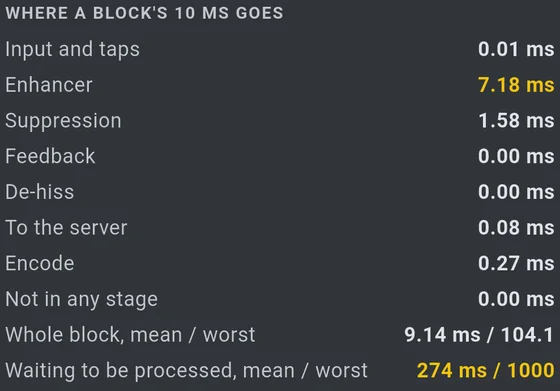
The third column is the deadline itself, broken down by stage: input and taps, echo cancellation, speech enhancer, suppression, feedback guard, de-hiss, transmit decision, encode, and not in any stage for what is left over.
Echo cancellation is the one to read differently from the rest. Every other stage costs about the same whatever is happening; this one costs almost nothing while nobody on the other end is talking and rather more while they are, because there is only something to cancel in the second case. A figure near zero on a quiet call is the stage working, not the stage missing.
Underneath are the two figures that decide whether this device is coping:
- Whole block, mean / worst. Read the mean. A single late block moves the worst by milliseconds and means nothing on its own; the mean is what the ladder reacts to, over a hundred blocks.
- Waiting to be processed, mean / worst. How much captured audio is queued up behind the chain. This is the one that turns into dropped microphone milliseconds if it keeps climbing.
Expect the enhancer to be most of the block — on the phone this was built for it is around 88% of it, and everything else together is under a millisecond. That is why it is the first thing softened and the last thing switched off.
The fourth column is per-server: the voice path (UDP direct or tunnelled over TCP), the ping, the channel you are in and how many people are in it.
The last thirty seconds
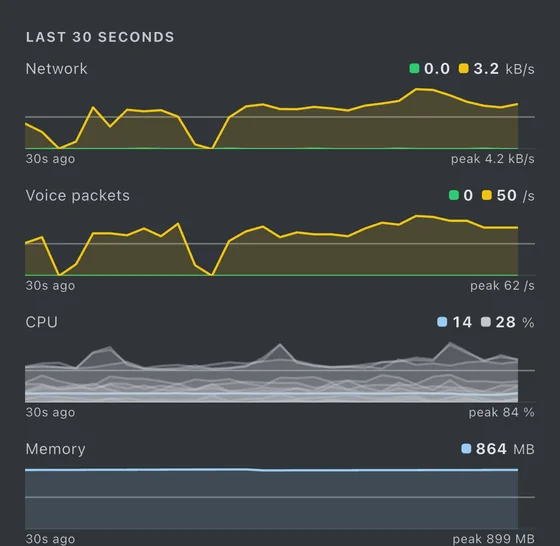
Network in and out, voice packets in and out, CPU and memory, each as a current value and a thirty-second trace with its peak. A number that is fine now and was not a moment ago is exactly the shape of an intermittent fault, and a single reading cannot show it.
Under the app’s own CPU line, one line per processor core. A phone with eight cores can sit at 30% overall while one core is pinned at 95%, and it is the pinned core that makes audio late — the chain runs on one thread, so a device average can look comfortable while the thread that matters has no room left. The ladder watches the cores for that reason, and this is where you can see what it saw.
Where the system will not report per-core figures to an app, the panel says so in words rather than drawing an empty graph or a flat line at zero. An absent measurement and a measurement of zero look identical on a chart and mean opposite things.
The engine log
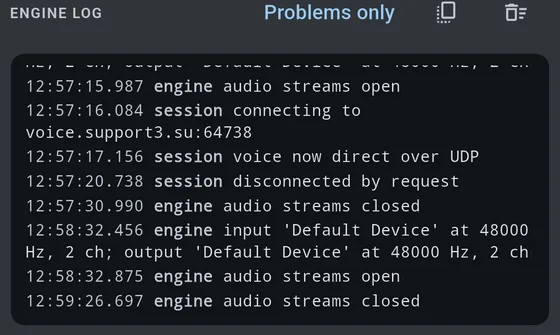
Timestamped lines from the audio engine and the session: devices opening and closing at which rate and channel count, connecting, voice going direct over UDP or falling back to TCP, disconnecting and why.
Problems only hides everything that went right, which is usually what you want. The two buttons beside it copy the log to the clipboard and clear it. Copying it into a message is more use to anyone helping you than a description of the symptom.
Record for diagnosis
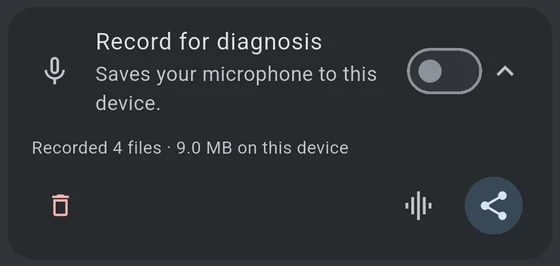
Saves your microphone to this device, along with what the chain decided about every 10 ms of it, and how the phone itself was moving — the accelerometer, the gravity direction and the gyroscope. Off unless you turn it on, and it says so on screen the whole time it is running.
The motion track is what makes it possible to tell a deliberate tap on the phone from a pothole, and it is written whether or not you use the tap gesture: measuring how often a detector fires by mistake needs rides in which nobody tapped at all. It is movement of the device and not location — there is no GPS here. Losses in it are reported separately from audio losses, because a gap in the motion track looks exactly like a stretch of road where nothing happened.
All three tracks are cut at the same points, so one segment’s three files cover the same stretch of the ride and can be read together.
Share produces a .zip per 18 MB, so a whole ride fits through anything
that carries files. See sending a diagnostic
recording.
Listen back
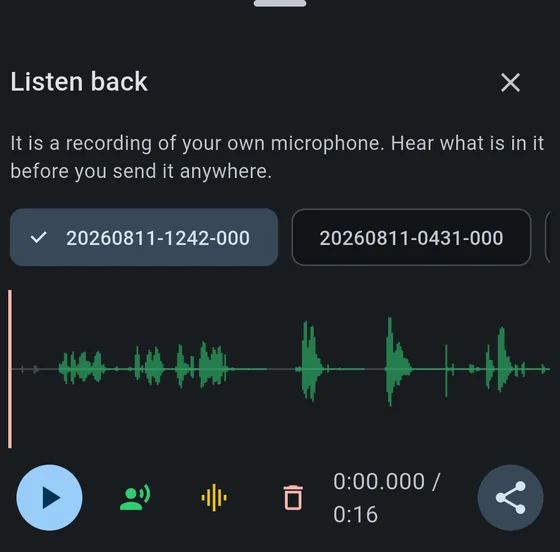
Plays a recording back with its waveform and a playhead you can drag or tap to scrub. The green stretches are the parts that actually went to the server, read from the decision log beside the audio — so the question a rider is really asking, was I heard here, is answered by the picture rather than by listening for a gap.
Pinch to zoom on a phone, or hold ctrl and use the wheel on a desktop; the playhead stays in view as it moves. The clock beneath counts milliseconds, because a gate that shuts mid-word does it well inside a second.
The two playback toggles
Beside the transport are two switches, outlined when off and filled when on. Both change what you hear rather than what is stored, and they answer the two halves of “how did I sound?” without needing a second person on a second device.
- Play only what would have been transmitted (green). Skips every stretch the gate closed, so you hear the far end’s version of the ride — the sentences with the swallowed beginnings and the dropped words, one after another. Silence you never notice while listening to the whole file becomes obvious the moment the gaps are taken out.
- Play through the voice processing chain (amber). Runs the recording back through suppression, gate and levelling as it plays, so you hear what goes out rather than what came in.
They combine: both on is the closest you can get, on your own, to sitting at the other end.
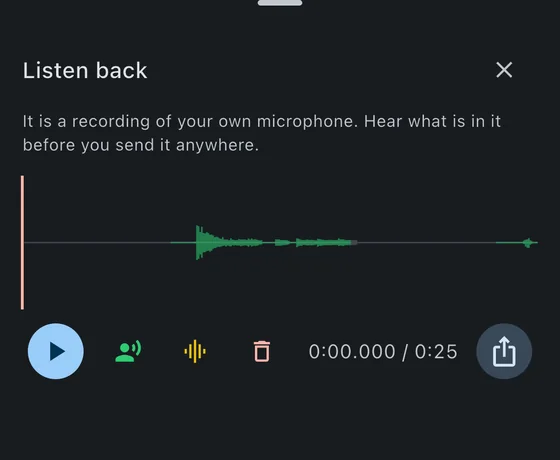
A recording with no green in it at all has a note under the waveform saying why — muted, push-to-talk, or a gate that never opened. That distinction matters, because “the app did not transmit” and “I had it muted” look identical on a waveform.
A single recording can be shared or deleted from here, which is where that decision actually gets made: you have just heard what is in it.
On the card and on the listen sheet alike, delete and share sit at opposite ends of their row, deliberately: one sends a file and the other destroys the only copy of a ride that cannot be recorded again. Only the destructive one asks first.